
Offline demo (no Node required)
The plugin ships a self-contained HTML demo under Resources/WebDemo/. Open one map, press Play, and you can verify the entire bridge in 30 seconds — no Vite, no npm install, no Node at all.
Open the map
- Enable Unreal React Bridge in your project (
Edit → Plugins → Web → Unreal React Bridge). - In the Content Browser, set the plugin filter to UnrealReactBridge and open
Maps/L_OfflineDemo. - Press Play.
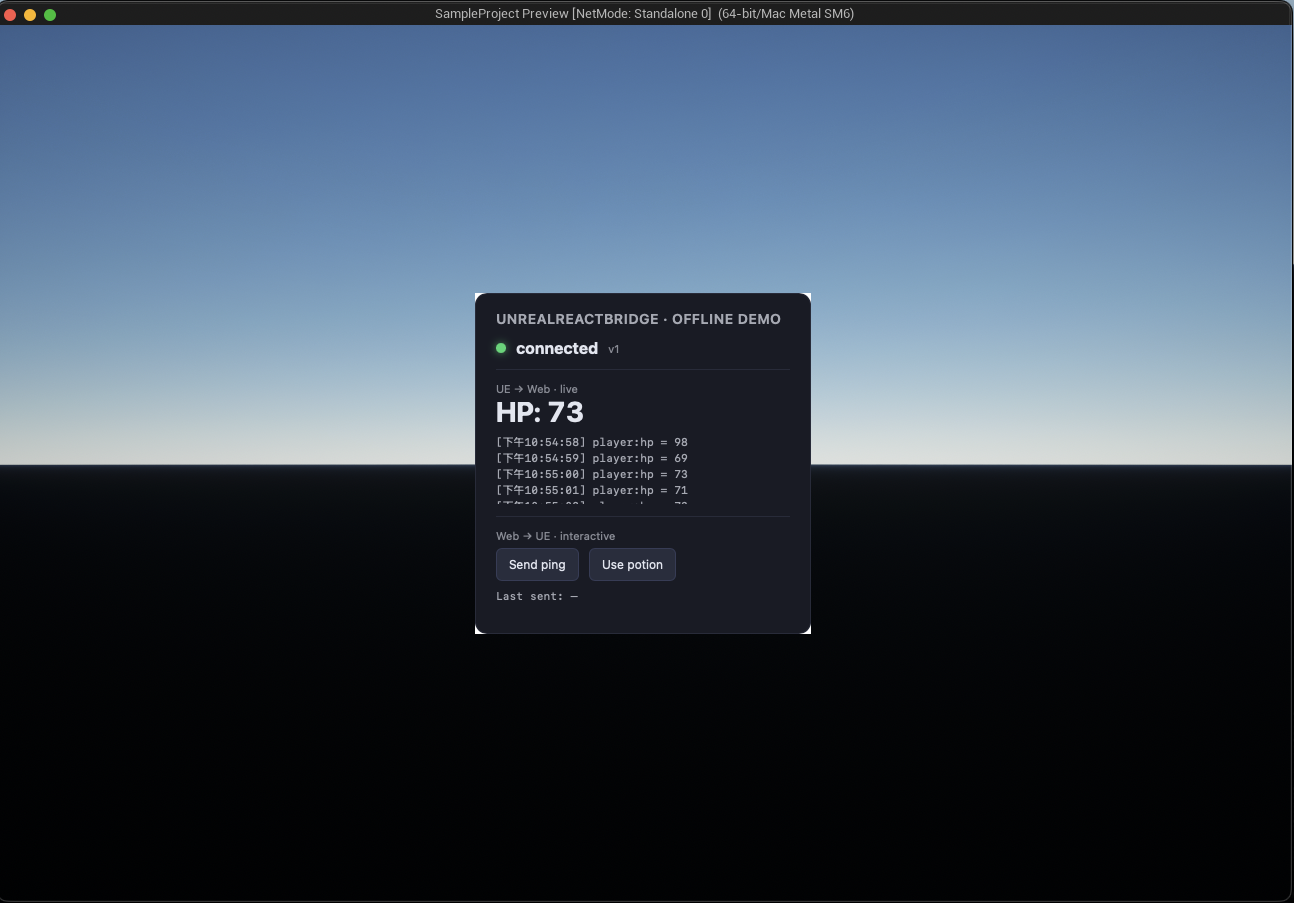
What you'll see
A dark HUD card with three panels stacked vertically:
| Panel | What it proves |
|---|---|
Bridge status — green dot, connected · v1 | ue5-bridge-ready fired; window.ue.bridge is bound |
UE → Web — HP number ticking once a second | The bundled AOfflineDemoActor pushes player:hp events; the HTML's addEventListener('player:hp', …) receives them |
Web → UE — Send ping / Use potion buttons | Clicking calls window.ue.bridge.onreactevent(…); UE's OnEventReceived fires; you can see the event in the Output Log |
When to use this vs. the dev server
| Offline demo | Dev server | |
|---|---|---|
| Toolchain | None | Node 18+, pnpm, Vite |
| Edit-reload loop | No | Yes — Vite HMR |
| Stack used | Vanilla HTML / JS | React + SDK + your CSS |
| Use case | First-look, Fab review, "does this work in my project at all?" | Daily development |
See Start the React dev server once you're ready to build your own HUDs.
Want the full multi-HUD demo instead?
L_OfflineDemo is the 30-second smoke test. For the buyer-facing HUD shown on the Fab listing (HP / minimap / skill bar / chat / keybindings), see Bundled multi-HUD demo.
How it works under the hood
A tiny C++ actor (AOfflineDemoActor) lives in L_OfflineDemo. On BeginPlay it calls Get Bundled Demo URL which returns a file:///<plugin>/Resources/WebDemo/index.html URL. That URL feeds into the existing Add Web HUD node, which mounts the HTML at a center-anchored layer. The HTML uses the documented Bridge Protocol v1 directly — no React, no SDK, no external dependencies.
Not for shipping
Don't use Get Bundled Demo URL as the URL of a HUD you intend to ship. The returned path is absolute and embeds the plugin's install location, so it won't survive being moved (cooked packaging, end-user installs, etc.). For shipped HUDs, package your React build under Content/Web/ and load it via a file:/// URL relative to the project, or serve it from an embedded HTTP server.